Geometry Vibes 3D
Click to play online instantly!
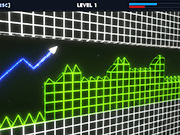
Geometry Vibes 3D
Geometry Vibes 3D Game Overview
What is Geometry Vibes 3D?
Geometry Vibes 3D is a fast arcade reflex game where you guide an arrow through bright geometric tracks. The challenge comes from timing each rise and fall while avoiding spikes, walls, and shifting obstacles. Players looking for Geometry Vibes 3D unblocked usually want instant browser play, quick restarts, and controls that work on both keyboard and mobile touchscreens.
The game is simple on purpose: one input changes your altitude, but every tunnel, spike, and moving hazard tests how calmly you can read the next pattern. Use this page as both a play link and a short control guide before chasing cleaner runs.
How to Play Geometry Vibes 3D
- Hold the mouse button, Spacebar, or W key to move upward.
- Release to drop and adjust your path.
- On mobile, tap and hold the screen to rise.
- Stay focused on the next obstacle instead of only the current one.
| Goal | Input | What to watch | Common mistake |
|---|---|---|---|
| Rise through a gap | Hold mouse, Spacebar, W, or touch | The ceiling angle after the gap | Holding too long and clipping the top wall. |
| Drop under a spike | Release the input | The next floor hazard | Dropping late because you looked only at the current spike. |
| Recover after a tight turn | Use short taps | Arrow momentum and tunnel height | Overcorrecting with one long press. |
| Improve a run | Restart quickly | The first obstacle that caused the crash | Changing every timing cue at once. |
Key Features
Neon 3D Style
Bright tracks and clean visual contrast make every run easy to read.
Quick Restarts
Short attempts make it easy to improve one run at a time.
Skill-Based Timing
Progress depends on rhythm, precision, and reaction speed.
Browser Play
Launch the game instantly on GameKpa without downloading anything.
Geometry Vibes 3D Unblocked Browser Play
Use a normal browser page when you want Geometry Vibes 3D unblocked. A safe play page should load over HTTPS, keep the game in the browser, and never ask you to install an extension or download an executable. If your network blocks game embeds, do not enter account details into proxy mirrors that promise special access.
No-download sessions
GameKpa keeps the playable frame near the top, so you can start a short reflex session without installing anything.
Mobile landscape mode
Rotate your phone if the tunnel feels too narrow. A wider view makes upcoming walls easier to read.
Short practice loops
Restart quickly and focus on one obstacle pattern at a time instead of treating every crash as random.
More reflex games
Try Arrow Wave, Geometry Platformer, or Wacky Flip if you like one-button timing challenges.
Modes, Difficulty, and Strategy
Geometry Vibes-style games often separate difficulty through tighter tunnels, faster obstacle rhythm, or survival-style attempts. Even when the current browser embed changes the exact labels, the best strategy stays the same: read one obstacle ahead, keep taps short, and avoid panic holds when the arrow starts drifting.
- Start slow: Use early attempts to learn how quickly the arrow rises and drops before chasing distance.
- Look ahead: Your eyes should move to the next wall as soon as your arrow clears the current gap.
- Use micro taps: Short inputs are safer than long holds in narrow sections.
- Control sound and distractions: Rhythm cues help some players, but silence can be better if the soundtrack makes you rush.
- Reset after fatigue: Reaction games get harder when your hand tenses up. Take a short break after repeated early crashes.
Loading and Control Troubleshooting
- If the game stays black: Refresh the game frame first, then reload the page if needed.
- If input feels delayed: Close heavy tabs, disable battery saver, and try a Chromium-based browser or Firefox.
- If mobile controls feel cramped: Rotate to landscape and use fullscreen so your finger does not cover the tunnel.
- If the page is blocked: Respect your network rules and avoid unofficial downloads that claim to be an unblocked launcher.
- If the embed looks broken: Send the URL and device details through the GameKpa support center.
Geometry Vibes 3D FAQ
Yes, you can play Geometry Vibes 3D for free in your browser on GameKpa.
Yes, the game supports mobile browser controls with tap-and-hold movement.
Hold the mouse button, Spacebar, W key, or touchscreen to rise. Release to drop. Use short taps when the tunnel becomes narrow.
GameKpa provides a no-download browser page for Geometry Vibes 3D. Whether it is available on a school or work network depends on that network's rules.
They share the same reflex-game idea of guiding a shape through geometric hazards, but this page focuses on the 3D browser version available on GameKpa.
Watch one obstacle ahead, use short inputs, practice the same opening pattern repeatedly, and take breaks when your timing becomes tense.